For the 1 in 10 people in the United States who don’t own a computer, accessing government services has become increasingly difficult. As services move increasingly online, residents without a computer and reliable internet service are locked out of essential systems. Tasks that were once handled in person now assume access to digital tools that many individuals simply do not have.
Federal Policy Accelerates the Digital Shift
Federal policy is accelerating this shift. The 21st Century Integrated Digital Experience Act (IDEA) and recent guidance from the Office of Management and Budget (OMB) direct agencies to establish a “digital-first public experience.” Agencies are required to digitize services and forms, expand the use of electronic signatures, and maximize self-service transactions.
At the same time, the federal government is also transitioning exclusively to electronic payments, ending the issuance of paper checks. The IRS states that electronic direct deposit is the fastest and safest way for individuals to receive a tax refund, and that the agency is phasing out paper checks for taxpayers. This shift makes digital access to an online bank account a necessity to receive and view payments.
Digital-First Mandate
Agencies must digitize services and maximize self-service transactions
Electronic Payments Only
Paper checks are being phased out across federal programs
Online Banking Required
Digital access is now necessary to receive and view payments
Digital-First Government Services
While these changes are intended to improve efficiency, access, and security, they risk deepening barriers for millions of people who remain unable to afford a computer. For example, the Social Security Administration now delivers many services online, requiring users to create an account through Login.gov or Id.me. To do so, individuals must have their own personal email address and complete multi-factor authentication, which requires access to a cellphone or smartphone authenticator app. Adults 65 and older can enroll in Medicare online through the Social Security Administration.
Accessing essential support such as food assistance through the Supplemental Nutrition Assistance Program (SNAP), cash assistance, housing support, child care, or training and employment opportunities now often requires completing an online application, providing an email address, and uploading supporting documents. Eligible individuals can apply for Medicaid health insurance through their state’s Department of Health website. While paper options still exist, online applications are processed more quickly and are the primary way people are encouraged to apply. For programs such as Temporary Assistance for Needy Families (TANF), benefits are managed electronically through debit cards and direct deposit, making reliable digital access a requirement for receiving this critical help.
Social Security & Medicare
Requires Login.gov or Id.me account with email and multi-factor authentication
SNAP & TANF
Online applications, document uploads, and electronic benefit management
Medicaid
State websites process online applications faster than paper options
Veterans and Essential Services Move Online
Veterans looking to sign up for benefits or check the status of their claim, such as disability compensation, healthcare, housing assistance, education and training, and careers and employment, are encouraged to create an account, verify their identity, apply online and submit their supporting documentation on the Department of Veterans Affairs’ website. In the words of one veteran, computer ownership is essential for applying for benefits:
“I am a disabled veteran who is trying to get help with a computer so I can file for my benefits.”
Too many are left behind because they do not have access to a computer.
Filing federal and state taxes assumes access to a computer as tax preparation software, and the ability to manage multiple forms and documents is difficult to complete on a smartphone. Similarly, claiming unemployment benefits often requires gathering and submitting documentation through state labor department websites.
Everyday civic services have also moved online. Most states now handle their driver’s license renewals and vehicle registrations digitally. For example, the New Jersey Motor Vehicle Commission no longer prints licenses or identification documents in person; documents are processed online, and residents are encouraged to print temporary licenses and registration documents until their new ones arrive in the mail.
Education and Public Access Challenges
For students applying for financial aid for postsecondary education, submitting the Free Application for Federal Student Aid (FAFSA) online each year is a requirement. Supporting documents, such as detailed income and household information, must be submitted online. Importantly, the FAFSA determines eligibility for the Federal Pell Grant, and is often the difference between accessing education or not.
While computer labs in public settings, such as libraries or schools, expand access to computers, they lack the privacy and security that owning a computer provides. Libraries and community centers with public computers often have limited evening and weekend hours, restricting access to resources and reducing opportunities for patrons to go online. Personal computer ownership provides users with greater control over when and where to access the internet and allows for more privacy.
Public Computer Labs
- Limited evening and weekend hours
- Lack privacy and security
- Restricted access to resources
Personal Computer Ownership
- Greater control over access times
- Enhanced privacy and security
- Unrestricted internet access
2024 Data Snapshot Shows A Persistent Digital Underclass
2024 American Community Survey (ACS) data reveal that more than 7.1 million people did not have access to a desktop or laptop computer, tablet, or smartphone. Another 25.8 million individuals relied solely on a smartphone to go online.
These figures understate the true need for computers because they exclude people living in group settings such as nursing homes, shelters, dormitories, or prisons, and individuals experiencing homelessness. The Department of Housing and Urban Development estimates that 771,480 people experienced homelessness in 2024. The Prison Policy Initiative estimates that nearly 2 million people are currently incarcerated in federal, state, local and tribal jails and prisons. According to the Department of Health and Human Services, 1.2 million people live in certified nursing homes. As one nursing home resident shared,
"I am a nursing home resident in need of a laptop. I have a monthly allowance of $50 per month and cannot afford to purchase a computer."
7.1M
No Device Access
People without access to any computer, tablet, or smartphone
25.8M
Smartphone Only
Individuals relying solely on smartphones to go online
771K
Experiencing Homelessness
People excluded from census computer ownership data
The Computer Ownership Gap Persists
Digitunity’s analysis of the U.S. Census data estimates that more than 17.7 million households or about 13.3% of all households, either lack access to any type of device or rely only on a smartphone to go online in 2024. This number does not capture households that may technically have a computer but do not have enough devices to meet their needs, often requiring one device to be shared among multiple family members.
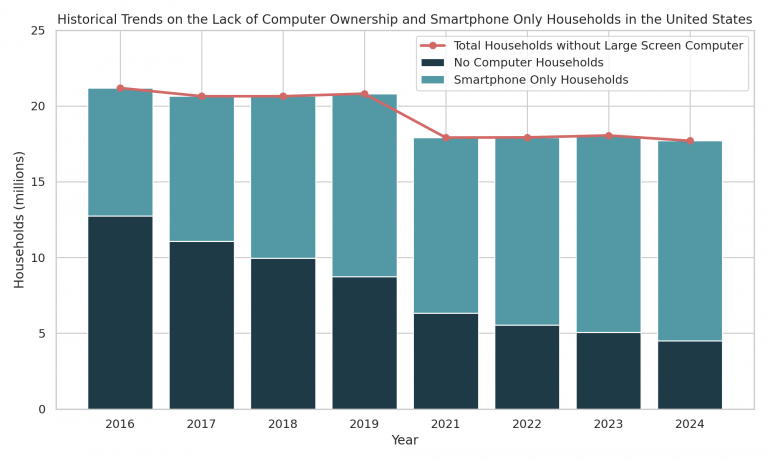
While the number of people without a computer has dropped since 2016, progress toward addressing the computer ownership gap has slowed. More individuals than ever are now relying exclusively on a smartphone to go online.
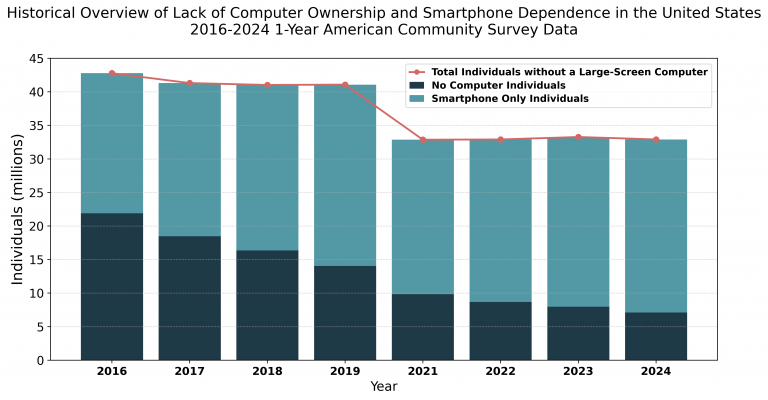
Since 2021, the share of people without a computer has stayed at about 10 percent of the population. Fragmented efforts, under-investment, and the lack of prioritizing this key issue across the public and private sectors have resulted in computer ownership increasing by only 3.66% over the last eight years.
Progress Has Stalled
Despite unprecedented attention during the Covid pandemic, 32.9 million individuals still lack access to a computer and progress has stalled. Closing the digital divide requires decisive action to build a permanent ecosystem that treats personal computer ownership, affordable internet access, and digital skills as essential public infrastructure. Without sustained investment and coordinated leadership, millions will remain excluded from work, education, healthcare, and basic government services.
Only 3.66% Improvement
Computer ownership has increased by just 3.66% over the last eight years
10% Stuck Without Access
The share of people without a computer has remained at about 10% since 2021
32.9 Million Left Behind
Millions remain excluded from essential government services despite increased attention to this issue during the pandemic.
Lack of Any Computer/Smartphone-only Access in the United States, Individuals (2016-2024
The data reveals significant disparities in computer access for approximately 10% of the U.S. population. Understanding the size of the problem is critical to addressing the digital divide.
| Year | 2016 | 2017 | 2018 | 2019 | 2021 | 2022 | 2023 | 2024 | Percentage of the U.S. Population | 13.58% | 13% | 12.86% | 12.83% | 10.14% | 10.12% | 10.18% | 9.92% |
|---|---|---|---|---|---|---|---|---|
| No Device of Any Kind | 21,894,313 | 18,480,988 | 16,358,350 | 14,044,106 | 9,834,794 | 8,695,343 | 7,968,017 | 7,111,169 |
| Smartphone Only | 20,885,528 | 22,826,222 | 24,668,748 | 27,031,137 | 23,029,313 | 24,209,014 | 25,300,800 | 25,795,748 |
| No Large-Screen Computer | 42,779,841 | 41,307,210 | 41,027,098 | 41,075,243 | 32,864,107 | 32,904,357 | 33,268,817 | 32,906,917 |
Source: MDAT summary of 1-year2016-2024 ACS data (Individuals)
Explore More
- To explore detailed analysis of the socio-demographic disparities in access to large-screen computers, check out Digitunity’s recent publication “Large-Screen Computer Ownership: A Call to Action.”
- Explore Digitunity’s state-level analysis of computer ownership gaps here.
- Sign up for Digitunity’s latest news and updates. A forthcoming analysis will examine the key differences between completing essential tasks on a computer versus a smartphone.